

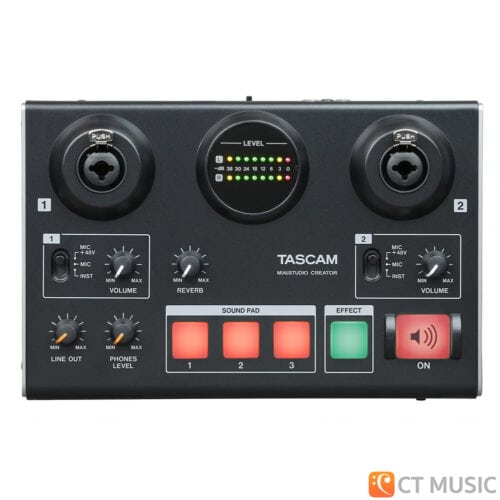
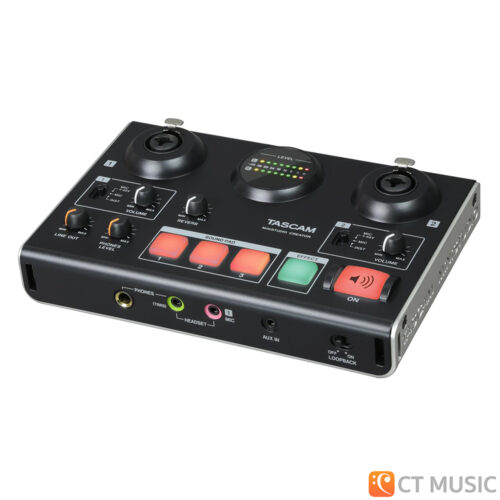
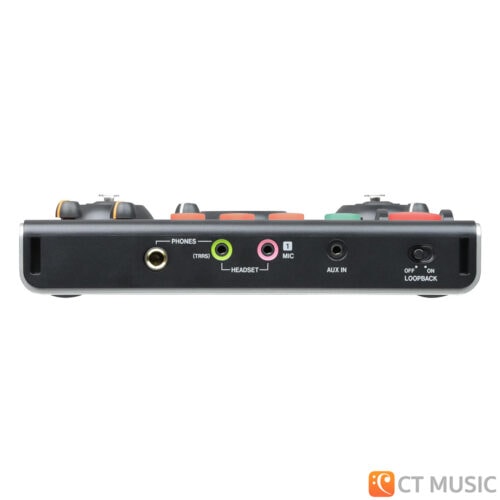
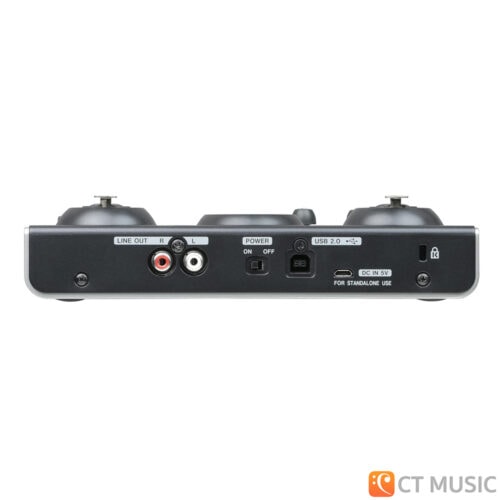
Description... Tascam MiNiSTUDIO Creator US-42B The Tascam MiNiSTUDIO Creator US-42B is a computer audio interface that has been developed to enable anyone to broadcast their programs to the world with ease. By using a dedicated device with high-quality audio circuits for mic and instrument input you lay the foundation for impressive sound in high quality. Moreover, the MiNiSTUDIO Creator offers several techniques that can make programs more interesting in order to grow your audience. Professional broadcasters, for example, call pre-recorded clapping, cheering and other sounds with a press of a button. With the Sound Pads on the MiNiSTUDIO Creator you too can trigger such sounds simply by pressing buttons. There is also a ducking function that lowers the volume of background music during announcements. And you can use voice effects and reverb to improve the atmosphere and raise the level of excitement of a program. Did we say audio quality? Providing your audience with sound that is easy to follow is also a way to make them feel more welcome. The MiNiSTUDIO Creator has excellent audio circuits inherited from music creation devices, so you can capture clear sound just by connecting a mic or other sound source. Since you will operate this device while broadcasting, ease-of-use is very important. The user interface has as few controls as possible so that it can be used intuitively even by people who are not knowledgeable about audio equipment. In addition, the dedicated software used for selecting sound effects and triggered sounds, has an EASY page that anyone can use and an EXPERT page for advanced users with all the details you can imagine. Use a Tascam MiNiSTUDIO Creator to make your own unique broadcast programs, or create podcasts that not only convince in terms of content, but also in terms of sound. Features at a glance Richly equipped audio interface for personal broadcasting, live gaming, film dubbing and other situations requiring two audio inputs and processing capabilities Audio interface features Supports Windows (ASIO/WDM) and Mac (Core Audio) Audio resolution up to 96 kHz / 24 bit Can be connected to an iOS device using an Apple Lightning-USB camera adapter (sold separately) USB Audio Compliance 2.0 for iOS connection Can be powered by USB when connected to a computer Operation confirmed with major DAW software including Sonar, ProTools, Cubase, Live, Studio One and GarageBand Operation confirmed with major streaming and calling software Hardware features Two HDDA (High Definition Discrete Architecture) mic preamps Two XLR/TRS input jacks support balanced input and can provide 48V phantom power Mini-jack mic input (for a headset, for example) 4-pole earphones with mic can be connected Stereo mini-jack AUX input to connect portable audio players and game devices Support for direct guitar input Support for low-level dynamic mic input signals DSP effects (equalizer, compressor and reverb) Input monitoring function allows input sounds to always be heard before they are transmitted Stereo analogue RCA output jacks suitable for connection to powered monitors Three illuminated and velocity-sensitive pads for triggering sound snippets Dedicated knob to adjust the amount of reverb effect Dedicated button to switch voice effect on/off Dedicated button to start transmission to the computer (“on air”) Stereo mini-jack headphones output 6.3-mm standard headphones output Separate controls for line and headphones output volumes Broadcast/Creator mode switch (live operation / production mode) Software features Dedicated software has Easy and Expert tabs for simple and quick setup or more detailed settings options Trigger pad settings: Audio files can be assigned by dragging and dropping Velocity can be turned on/off Volume is adjustable Repeat can be switched on/off Fade in/out can be set Start time can be set Mode presets for different operation scenarios (Windows only): Creator: The default setting for usual operation using DAW software Karaoke: A preset suitable for internet karaoke Talking: A preset for talking using ordinary Internet audio/video communication applications, for example, while using the trigger pads or playing background music from an audio application Gaming: Ideal setting for live streaming of game play while talking to other players in games that support voice chat Multi-channel podcast: Offering six ASIO input channels, this preset can be used with DAW software where different audio signals can be recorded to separate tracks, and adjustments can be made independently, allowing you to easily create sophisticated podcast materials Four instant sound presets with equalizer and compressor settings (on “Easy” page) Five voice effect presets, each with one adjustable parameter Five reverb presets (Hall, Room, Live, Studio, Plate) with one adjustable parameter each Mic input can be switched mono/stereo (mono in Broadcast mode, stereo in Creator mode) ASIO on/off switch allows mic audio to be transmitted after effect processing (Windows only) Loopback function mixes the audio signal supplied by the computer with the input signal and sends it back to the computer (automatically off in Creator mode) Volume adjustment for PC output sound and audio transmitted to PC Transmitted signal can be switched mono/stereo A ducking function can automatically lower the volume of background music, for example, in response to mic input Buffer size can be set (64/128/256/512/1024, Windows only) Other features Lightweight design convenient for mobile use Two strap attachment points allow commercially-available camera straps to be used Restrictions when using with iOS devices External power supply is necessary This unit will not provide power to the iOS device An Apple Lightning-to-USB Camera Adapter (sold separately) is required for connection Sound trigger pads cannot be used Effect type cannot be changed Supported Operating Systems Windows Windows 11 Windows 10 (November 2021, version 21H2) Windows 10 (May 2021, version 21H1) Windows 10 (October 2020, version 20H2) Windows 10 (May 2020, version 2004) Windows 8.1 Windows 7 Mac macOS Monterey (12.0) macOS Big Sur (11.0) macOS Catalina (10.15) macOS Mojave (10.14) macOS High Sierra (10.13) iOS iOS 15 / iPadOS 15 iOS 14 / iPadOS 14 iOS 13 / iPadOS 13 iOS 12 iOS 11 Specifications Audio specifications Sampling frequencies 44.1 kHz, 48 kHz, 88.2 kHz, 96 kHz Quantization bit depth 16/24 bit Analogue audio inputs Mic inputs 1/2 (balanced) XLR-3-31 (1: GND, 2: HOT, 3: COLD) 6.3-mm standard TRS stereo jack (Tip: HOT, Ring: COLD, Sleeve: GND) Input impedance 2.4 kΩ Nominal input level (VOLUME at MAX) −65 dBu (0.0004 Vrms) Nominal input level (VOLUME at MAX) −20 dBu (0.0775 Vrms) Maximum gain 45 dB Instrument inputs 1/2 (unbalanced) 6.3mm standard TS jacks (Tip: HOT, Sleeve: GND) Input impedance 1 MΩ or higher Maximum gain 45 dB External mic inputs (can provide plug-in power) 3.5-mm 4-pole mini jack 3.5-mm mini jack Input impedance 5 kΩ or higher Maximum gain 45 dB External input jack 3.5-mm stereo mini jack Input impedance 5 kΩ or higher Maximum input level 7.7 dBV (2.427 Vrms) Analogue audio outputs Line outputs (unbalanced, LINE OUT R/L) RCA pin jacks Output impedance 200 Ω or higher Nominal output level –10 dBu (0.316 Vrms) Maximum output level 6 dBu (1.995 Vrms) Headphones outputs Standard 6.3-mm stereo jack 3.5-mm 4-pole mini jack 3.5-mm stereo mini jack Maximum output power 15 mW 15 mW or higher (THD N 0.1% or less, 32 Ω) Other inputs and outputs USB 4-pin USB B-type Transfer rate USB 2.0 Hi-speed (480 Mbit/s) Power supply (DC IN 5V) USB Micro B type Audio performance Mic preamp EIN (equivalent input noise) −120 dBu or less (150 Ω termination, VOLUME at MAX) Frequency response (IN 1 / IN 2 to LINE OUT/headphones output (6.3-mm stereo jack)) 44.1/48 kHz 20 Hz: 0/−1 dB (JEITA) 20 kHz: 0/−1 dB (JEITA) 20 kHz: 0 /−3 dB (headphones output, JEITA) 88.2/96 kHz 20 Hz: 0/−1 dB (JEITA) 40 kHz: 0/−1 dB (JEITA) 40 kHz: 0 /−3 dB (headphones output, JEITA) S/N ratio 100 dB or higher (IN 1 / IN 2 to LINE OUT, VOLUME at MIN, JEITA) Distortion 0.005 % or less (IN 1 / IN 2 to LINE OUT, 1 kHz sine wave, nominal input level, maximum output level, JEITA) Crosstalk attenuation 95 dB or more (IN 1 / IN 2 to LINE OUT, 1 kHz sine wave, JEITA) Operation requirements Windows Computer hardware requirements Windows-compatible computer with a USB 2.0 (or higher) port CPU/processor speed 2 GHz or faster dual core processor (x86) Memory 2 GB or more Supported audio driver ASIO 2.0, WDM Mac Computer hardware requirements Mac with a USB 2.0 (or higher) port CPU/processor speed 2 GHz or faster dual core processor Memory 2 GB or more Supported audio driver Core Audio Power supply and other specifications Power supply Used with a computer USB bus power Used with an iOS device USB power adapter (that can supply 5 V and a current of at least 700 mA)1 External battery pack (that can supply 5 V and a current of at least 700 mA)2 1 We strongly recommend using the USB power adapter included with the iPad/iPhone. No USB power adapter is included with an iPod Touch. To use it with an iPod Touch, purchase a genuine Apple USB power adapter (that can supply 5 V and a current of at least 700 mA) separately. 2 We strongly recommend using a Tascam BP-6AA external battery pack. If using another external battery pack or mobile battery, purchase one that can supply 5 V and a current of at least 700 mA. Power consumption 2.5 W Dimensions (H × W × D, without protrusions) 40 mm × 200 mm × 130 mm Weight 500 g Operating temperature range 5–35 °C webmaster
Related products
-
 $ 33.77
Share the gift of warmth or just enjoy 24 days of delicious teas with our Advent Calendar.
Choose from our black tea, variety or decaf calendars. -
London Fog Tea Box
-
Pumpkin spice tea lovers box
-
This makes an excellent gift or just a great way to try a variety of teas.